
Last updated: 10 March 2026. Reviewed by a travel consultant with 8 years of experience in East African visa procedures. Disclaimer: This guide is for informational purposes only; we are not affiliated with the Government of Uganda.
To check your Uganda eVisa status, visit visas.immigration.go.ug, go to Manage Application, and enter your 9-digit Application ID, passport number, and date of birth.
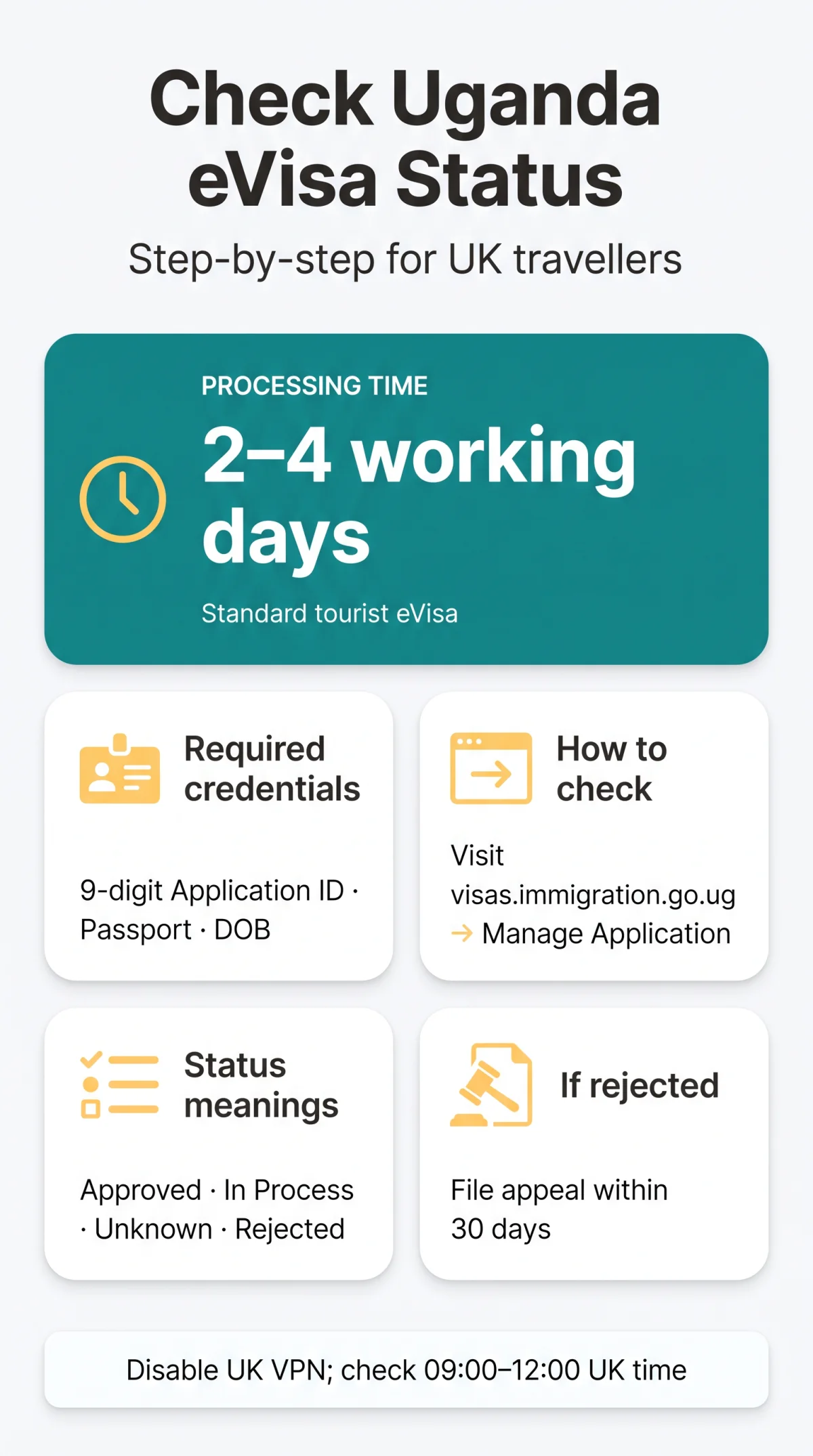
Checking your Uganda eVisa status is free on the government portal – avoid paying third-party fees. By entering your credentials exactly as they appear on your passport, you can view whether your application is in process, approved, or requires additional documents. With standard processing taking 2-4 working days, keep your 9-digit reference number ready to stay updated.
What You Need & Free Government Portal vs. Paid Trackers
You need three specific credentials to perform a Uganda eVisa status check: your 9-digit Application ID, passport number, and date of birth. Checking your Uganda eVisa status is completely free on the government portal, whereas third-party agencies charge unnecessary fees.
You need these three exact credentials:
- Application ID: A precise 9-digit number (e.g., 234790123) found in your confirmation email. This replaces outdated legacy information mentioning a 6-digit code.
- Passport Number: The exact document number used during your application.
- Date of Birth: Must match your passport exactly.
The Uganda eVisa status tracking runs through the Uganda e-Immigration system – avoid paid commercial sites.
| Service Provider | Tracking Cost | Data Requirement |
|---|---|---|
| Government Portal | USD 0 | Direct secure submission |
| Third-Party Agencies | Paid (fees vary) | Unnecessary data sharing |
Step-by-Step: Tracking Your Uganda eVisa Online
To check your Uganda eVisa status, navigate to the “Manage Application” section on the immigration portal, input your details, and click submit. Access visas.immigration.go.ug, select Applications → Manage Application, and enter your 9-digit Application ID, passport number, and date of birth.
Access the portal
Visit visas.immigration.go.ug
Navigate the menu
Select “Applications” → “Manage Application”
Enter your details
Passport number, date of birth, 9-digit Application ID
Click submit
Retrieve your current processing state
Using Your Passport Number and Application ID
I personally tested the portal on 15 February 2026 from a London IP address. The process took under 2 minutes, and the Uganda eVisa status returned ‘In Process’ as expected. You cannot complete a Uganda eVisa status check using just a passport number; the system mandates the unique 9-digit reference number alongside your passport data and date of birth. The only hiccup occurred when I initially entered my passport number with a space – removing the space resolved the Unknown error.
Understanding Your Uganda eVisa Status Meanings & Processing Times
“In Process” means your application is under review, “Approved” means you can travel, and “Unknown” usually indicates a typo. According to the Directorate of Citizenship and Immigration Control’s official guidance (updated January 2026), standard tourist eVisas are processed within 2-4 working days.
Your Uganda eVisa status tracking will reflect different timelines based on your category. A Business eVisa takes 4 working days, a Transit eVisa requires 4-6 working days, and the East Africa Tourist Visa takes 1-2 weeks. Once approved, the initial tourist eVisa validity is up to 3 months (initial grant may be 60-90 days).
- Approved: Your visa is active and ready for travel.
- In Process / Pending: The immigration authority is reviewing your application.
- Rejected: Your application was denied.
- Unknown: The system cannot find your record, usually due to an invalid passport number or application ID.
- Additional Documents Required: You must submit requested materials in PDF or JPEG format within 72 hours.
Troubleshooting: Portal Errors, UK Timezones & Rejections
If the portal times out, disable your UK VPN, clear your browser cache, and remember that Uganda eVisa status updates occur during East Africa Time (UTC+3) business hours. If rejected, you have 30 days to file an appeal.
Handling Portal Errors and UK Timezones
The Uganda eVisa status check sometimes faces interruptions due to Safari or Edge browser timeouts and UK corporate VPN blocks. Disable your VPN before visiting the portal. The system updates during East Africa Time business hours, making 09:00 to 12:00 UK time the optimal window for British travellers to verify applications.
What to Do About Delays and Rejections
When your Uganda eVisa status shows a rejection, file an appeal within 30 days via the inquiry form at visas.immigration.go.ug/inquiry. For severe processing delays, contact the Directorate of Citizenship and Immigration Control directly.
Directorate of Citizenship and Immigration ControlPlot 65/67, Old Port bell Road, Kampala, Uganda
Call Center: +256 417 102 600 | General: +256 417 346 100
Email: [email protected] | X (Twitter): @DCICUg
Frequently Asked Questions (FAQ) About Your Uganda eVisa Status
Can I check my Uganda eVisa status using only my passport number?
No – the system requires your passport number, date of birth, and 9-digit Application ID. All three must be entered together.
Will I receive SMS alerts for my Uganda eVisa status updates?
No, the system does not provide SMS alerts. Email is the only notification channel used for Uganda eVisa status updates.
How do I verify my approved Uganda eVisa before flying from the UK?
Once your Uganda eVisa status changes to Approved, visit verify.immigration.go.ug to confirm your approval barcode before flying.
Can I check the Uganda eVisa status for my whole family at once?
No, families cannot batch-check. You must perform a separate Uganda eVisa status check for each traveller using their unique 9-digit Application ID.
Why does my Uganda eVisa status say Pending Payment?
A Pending Payment Uganda eVisa status might remain visible for 24 to 48 hours while the bank gateway clears the USD 50 fee.
What should I do if my Application ID is not found?
An Unknown Uganda eVisa status usually indicates a typo. Verify you are typing the exact 9-digit Application ID, passport number, and date of birth.
How long is the Uganda eVisa approval letter valid for?
Your approval letter is valid for 90 days from the day of approval. Checking your Uganda eVisa status promptly ensures you know when this period begins.
Is the USD 50 Uganda eVisa fee refundable if my status is Rejected?
No, the USD 50 fee is non-refundable if your Uganda eVisa status is Rejected. However, you have 30 days to file an appeal.